🚚 Free Worldwide Shipping on All Orders!Shop Now
\n
\n\n
\n
\n
\n
\"AULA
\n
\n

\n
\n
\n
\n
\n
\n
\"AULA
\n
\n
\n
\n
\n
\n
\n\n\n
\n
\n
\n
\n\n
\n
\n\n\n
\n
\n
\n
\n
\n
\n\n
\n
\n
\n
\n
\n
\n
\n
\n
\n
    \n
  • \n

    How to download the software? Is it compatible with Mac?

    \n

    1.Download the software via bit.ly/m/AULA

    \n

    2.This F108Pro mechanical keyboard is compatible with Windows, Mac, IOS and Android systems, but the software only supports Windows system and wired mode.

    \n
  • \n
  • \n

    How to calibrate the date/time and custom GIF images on the screen?

    \n

    1.Download and install the F108pro driver in wired mode with windows system.

    \n

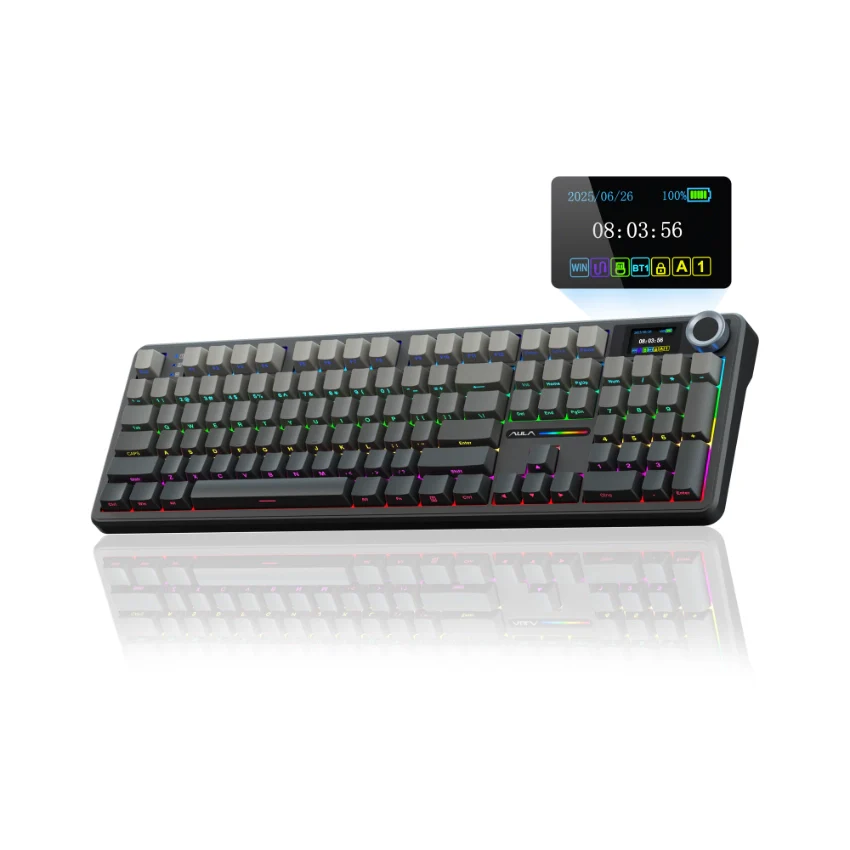
    2.Find the \"TFT screen\" and click to \"Time Syns\" button.

    \n

    3.Upload an image or gif

    \n

    Note: The LCD screen has a transparent protective film that can be peeled off before use.

    \n
  • \n
  • \n

    AULA F108 Pro backlight/side light shortcut key?

    \n

    Backlight Adjustment:

    \n

    FN+\\|=switch 19 lighting effects;FN+Tab=switch lighting colors;FN+↑/↓=lighting brightness+/-;FN+→/←=lighting speed+/-

    \n

    Side Light Adjustment:

    \n

    FN+Right Shift=Switch effect;FN+/?=Switch color;FN+Right Alt=Switch brightness

    \n
  • \n
  • \n

    How to quickly solve keyboard unresponsive or other unknown issues?

    \n

    Reset the keyboard by holding down FN+ESC for a few seconds until the keyboard light flashes

    \n
  • \n
  • \n

    How to view the instruction manual? And receiving incorrect product colors

    \n

    Scan the QR on the card inside the packaging to view the instruction manual

    \n

    The keyboard packaging is uniformly gray yellow, please refer to the actual color inside the packaging for accuracy

    \n
  • \n
\n
\n
\n
\n
\n

\n
\n
\n\n
\n
\n
\n
\n
\n\n
\n\n
\n
\n

\n
\n
","image":["/images/lategaming.shop/images/product/aula-f108-pro-1.webp","/images/lategaming.shop/images/product/aula-f108-pro-2.webp","/images/lategaming.shop/images/product/aula-f108-pro-3.webp","/images/lategaming.shop/images/product/aula-f108-pro-4.webp","/images/lategaming.shop/images/product/aula-f108-pro-5.webp","/images/lategaming.shop/images/product/aula-f108-pro-6.webp","/images/lategaming.shop/images/product/aula-f108-pro-7.webp","/images/lategaming.shop/images/product/aula-f108-pro-8.webp","/images/lategaming.shop/images/product/aula-f108-pro-9.webp","/images/lategaming.shop/images/product/aula-f108-pro-10.webp","/images/lategaming.shop/images/product/aula-f108-pro-11.webp","/images/lategaming.shop/images/product/aula-f108-pro-12.webp","/images/lategaming.shop/images/product/aula-f108-pro-13.webp","/images/lategaming.shop/images/product/aula-f108-pro-14.webp","/images/lategaming.shop/images/product/aula-f108-pro-15.webp","/images/lategaming.shop/images/product/aula-f108-pro-16.webp","/images/lategaming.shop/images/product/aula-f108-pro-17.webp","/images/lategaming.shop/images/product/aula-f108-pro-18.webp","/images/lategaming.shop/images/product/aula-f108-pro-19.webp","/images/lategaming.shop/images/product/aula-f108-pro-20.webp","/images/lategaming.shop/images/product/aula-f108-pro-21.webp","/images/lategaming.shop/images/product/aula-f108-pro-22.webp","/images/lategaming.shop/images/product/aula-f108-pro-23.webp","/images/lategaming.shop/images/product/aula-f108-pro-24.webp","/images/lategaming.shop/images/product/aula-f108-pro-25.webp","/images/lategaming.shop/images/product/aula-f108-pro-26.webp","/images/lategaming.shop/images/product/aula-f108-pro-27.webp","/images/lategaming.shop/images/product/aula-f108-pro-28.webp","/images/lategaming.shop/images/product/aula-f108-pro-29.webp","/images/lategaming.shop/images/product/aula-f108-pro-30.webp","/images/lategaming.shop/images/product/aula-f108-pro-31.webp","/images/lategaming.shop/images/product/aula-f108-pro-32.webp","/images/lategaming.shop/images/product/aula-f108-pro-33.webp","/images/lategaming.shop/images/product/aula-f108-pro-34.webp","/images/lategaming.shop/images/product/aula-f108-pro-35.webp","/images/lategaming.shop/images/product/aula-f108-pro-36.webp","/images/lategaming.shop/images/product/aula-f108-pro-37.webp","/images/lategaming.shop/images/product/aula-f108-pro-38.webp","/images/lategaming.shop/images/product/aula-f108-pro-39.webp","/images/lategaming.shop/images/product/aula-f108-pro-40.webp","/images/lategaming.shop/images/product/aula-f108-pro-41.webp","/images/lategaming.shop/images/product/aula-f108-pro-42.webp","/images/lategaming.shop/images/product/aula-f108-pro-43.webp","/images/lategaming.shop/images/product/aula-f108-pro-44.webp","/images/lategaming.shop/images/product/aula-f108-pro-45.webp","/images/lategaming.shop/images/product/aula-f108-pro-46.webp","/images/lategaming.shop/images/product/aula-f108-pro-47.webp","/images/lategaming.shop/images/product/aula-f108-pro-48.webp","/images/lategaming.shop/images/product/aula-f108-pro-49.webp","/images/lategaming.shop/images/product/aula-f108-pro-50.webp","/images/lategaming.shop/images/product/aula-f108-pro-51.webp","/images/lategaming.shop/images/product/aula-f108-pro-52.webp","/images/lategaming.shop/images/product/aula-f108-pro-53.webp","/images/lategaming.shop/images/product/aula-f108-pro-54.webp","/images/lategaming.shop/images/product/aula-f108-pro-55.webp"],"sku":"aula-f108-pro","brand":{"@type":"Brand","name":"AULA Official Shop"},"offers":{"@type":"AggregateOffer","lowPrice":26.4,"highPrice":26.97,"priceCurrency":"USD","availability":"https://schema.org/InStock","url":"https://lategaming.shop/products/aula-f108-pro","offerCount":6}}
AULA F108 Pro Full Size vision Knob Keyboard
HomeStore

AULA F108 Pro Full Size vision Knob Keyboard

AULA F108 Pro Full Size vision Knob Keyboard

Select color
Select switch
From $26.40

Original: $88.00

-70%
AULA F108 Pro Full Size vision Knob Keyboard

$88.00

$26.40

The Story


Product Description

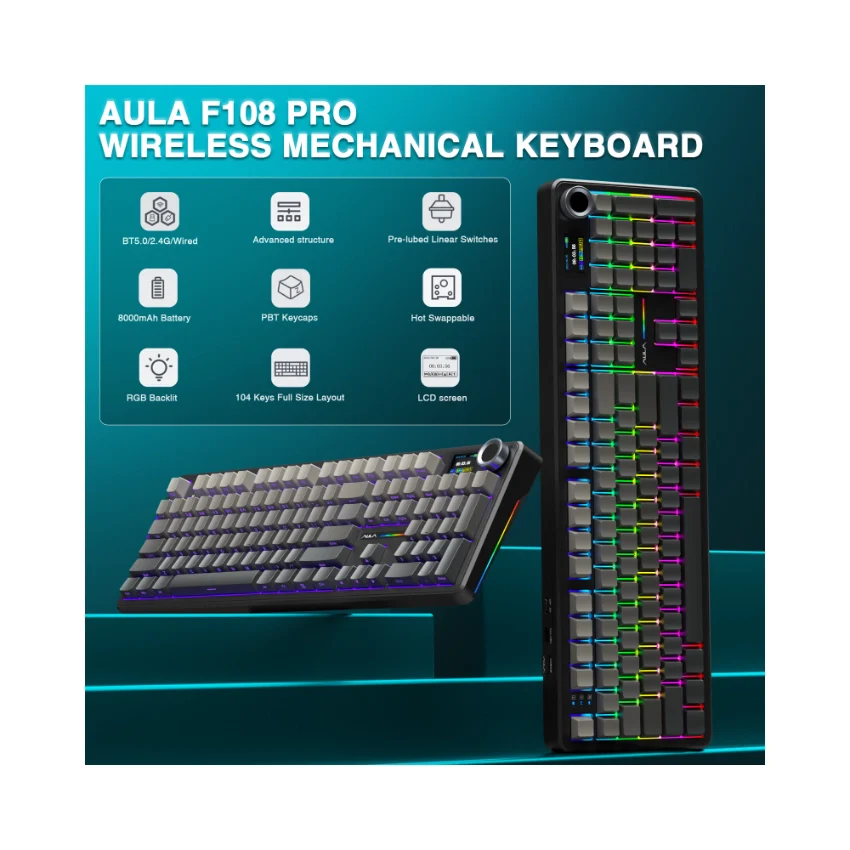
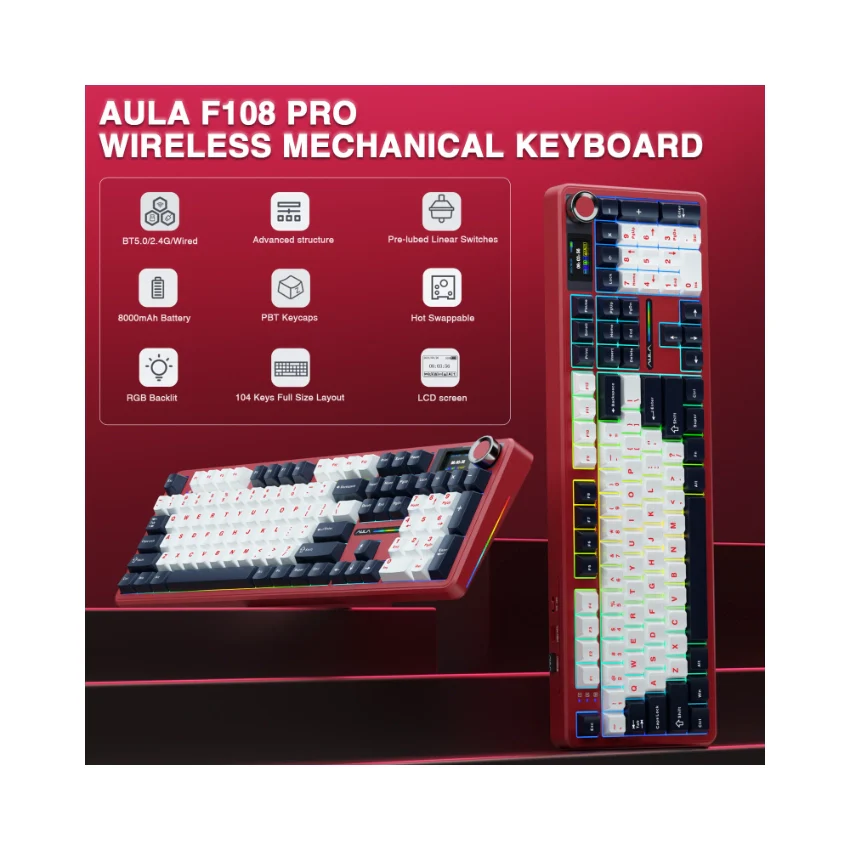
AULA F108 PRO - computer keyboard

AULA F108 PRO - creamy keyboard with number pad
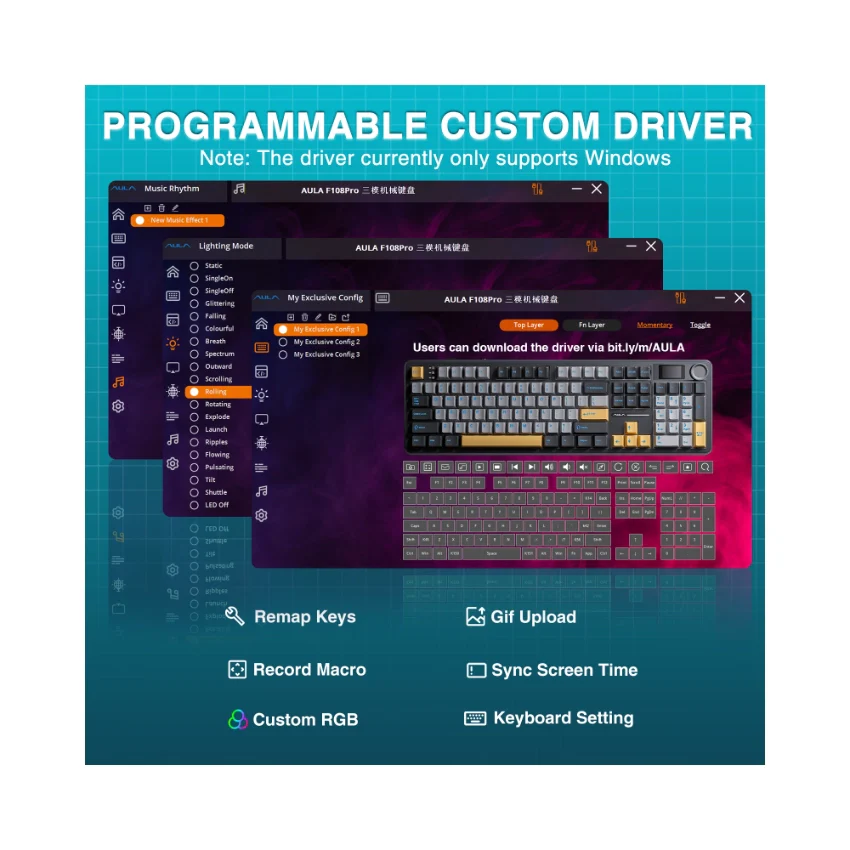
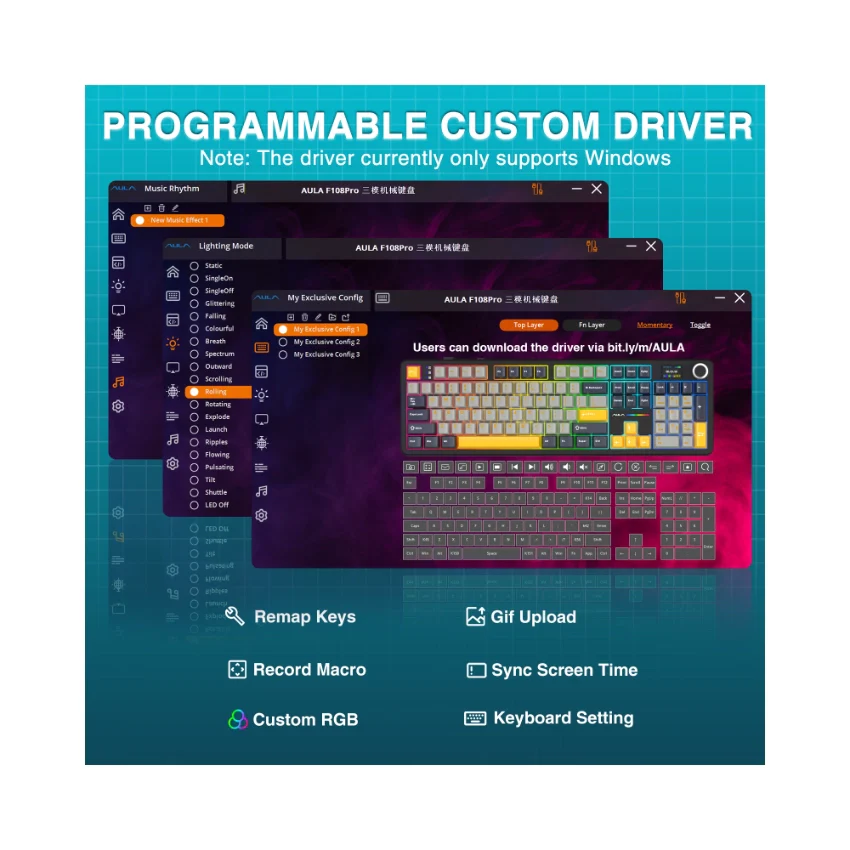
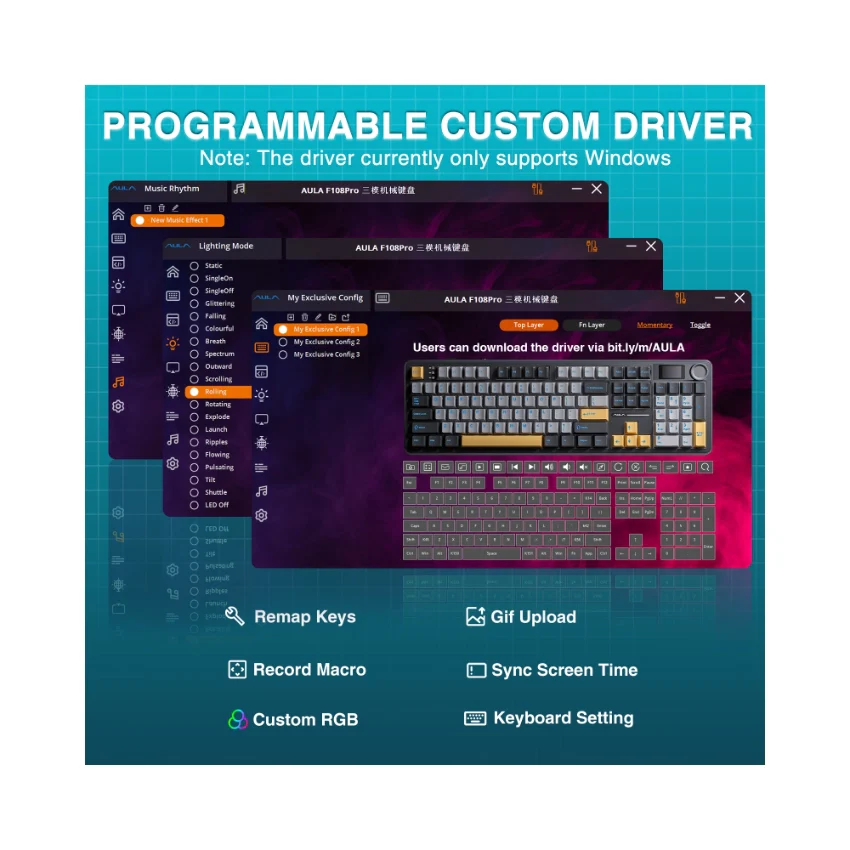
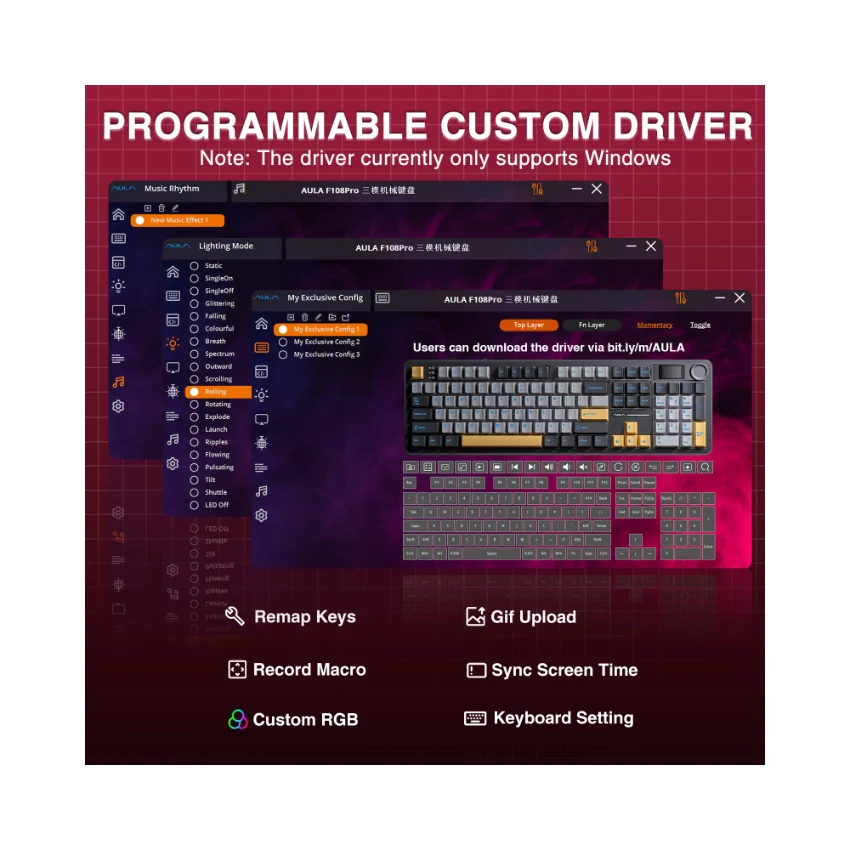
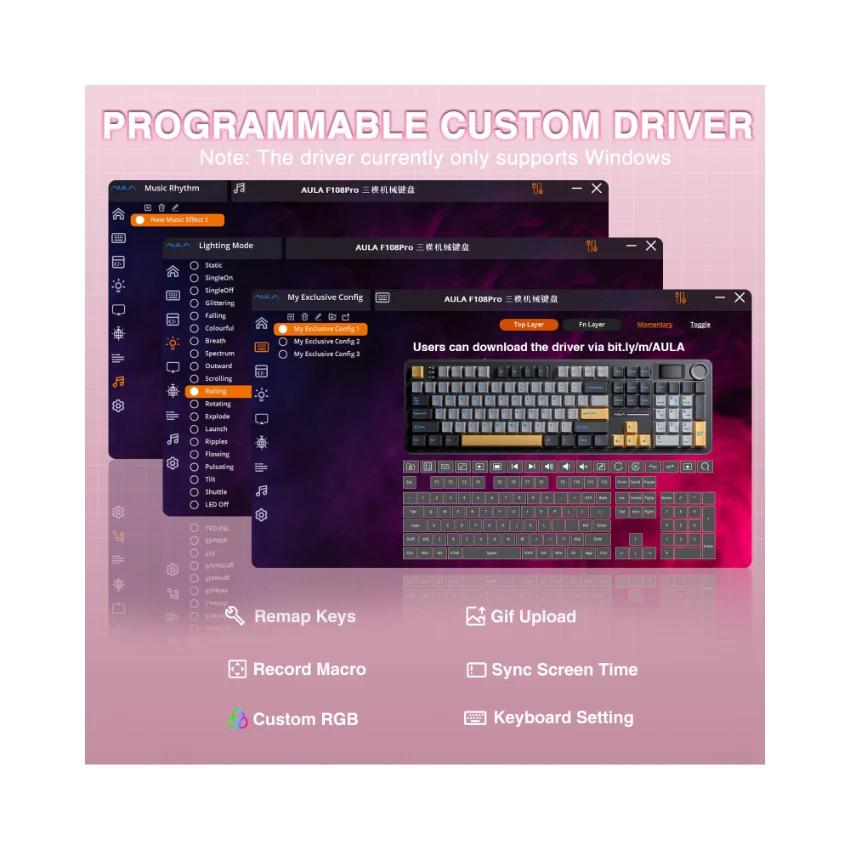
  • How to download the software? Is it compatible with Mac?

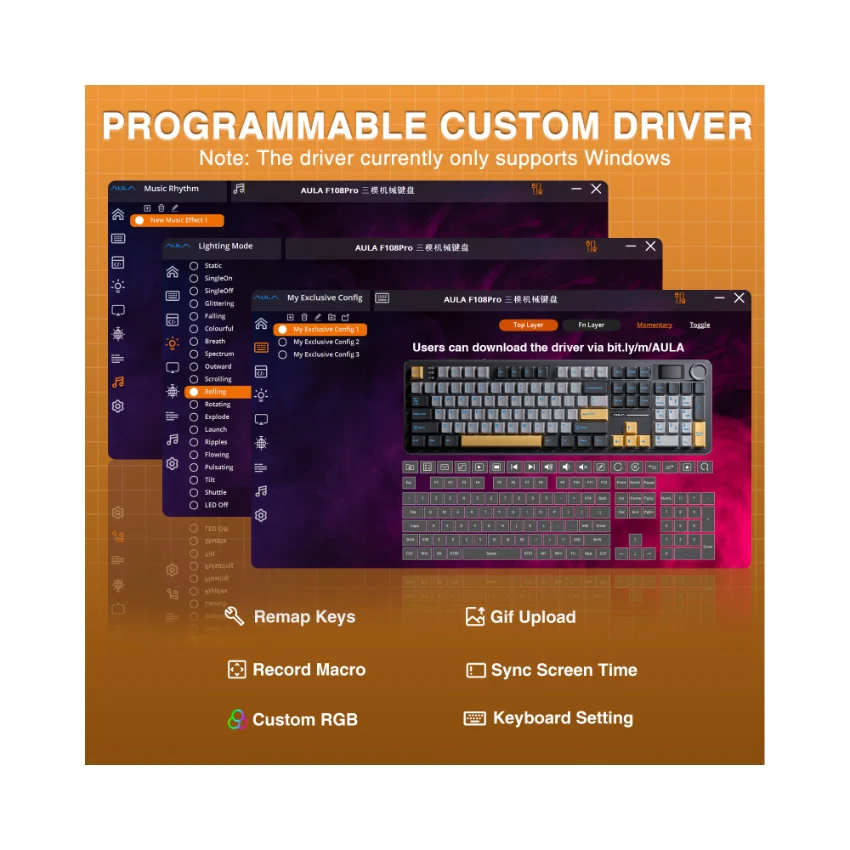
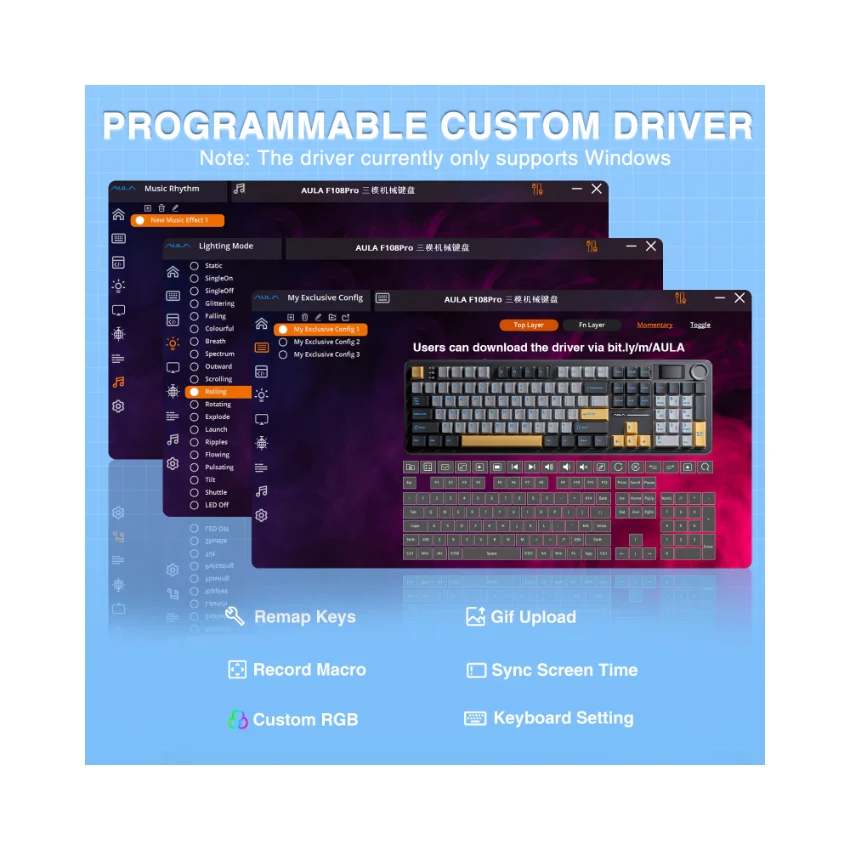
    1.Download the software via bit.ly/m/AULA

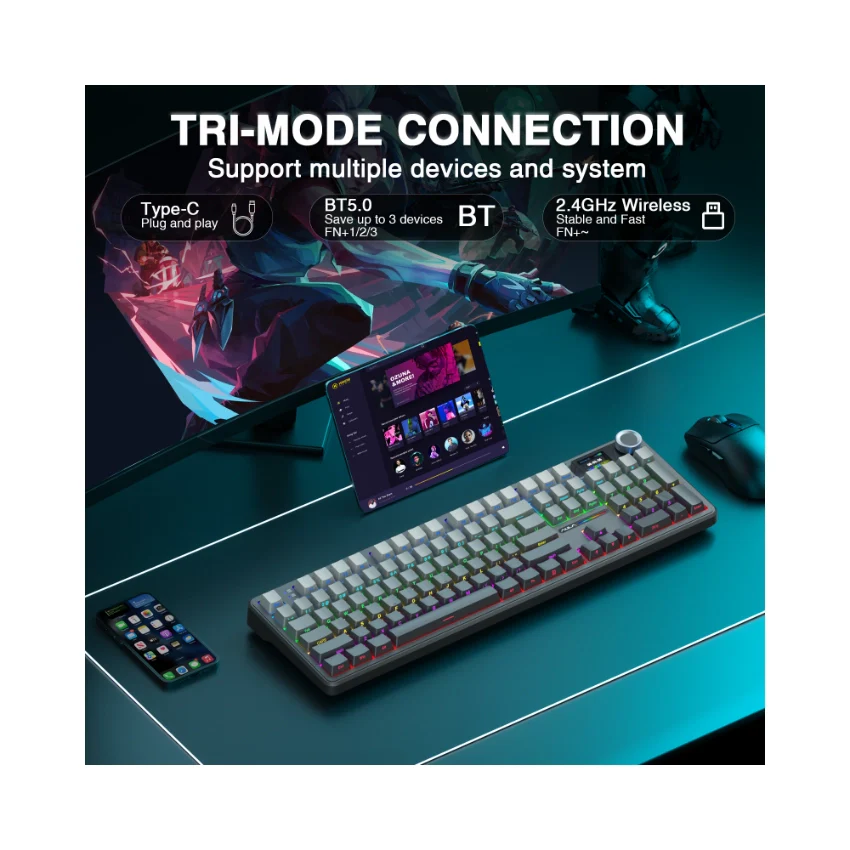
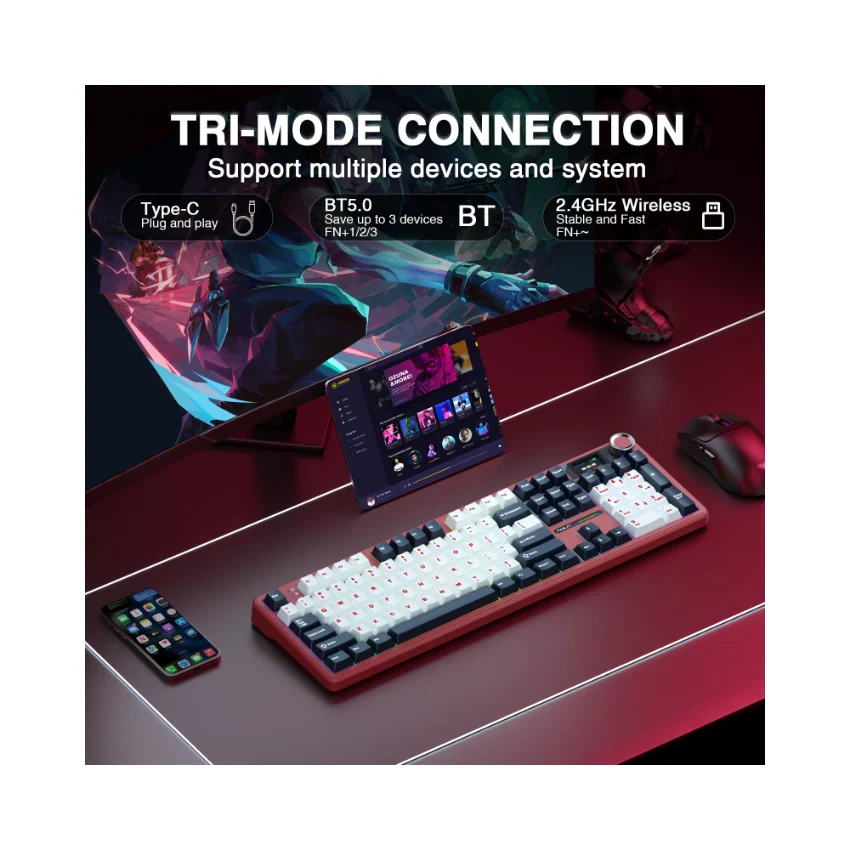
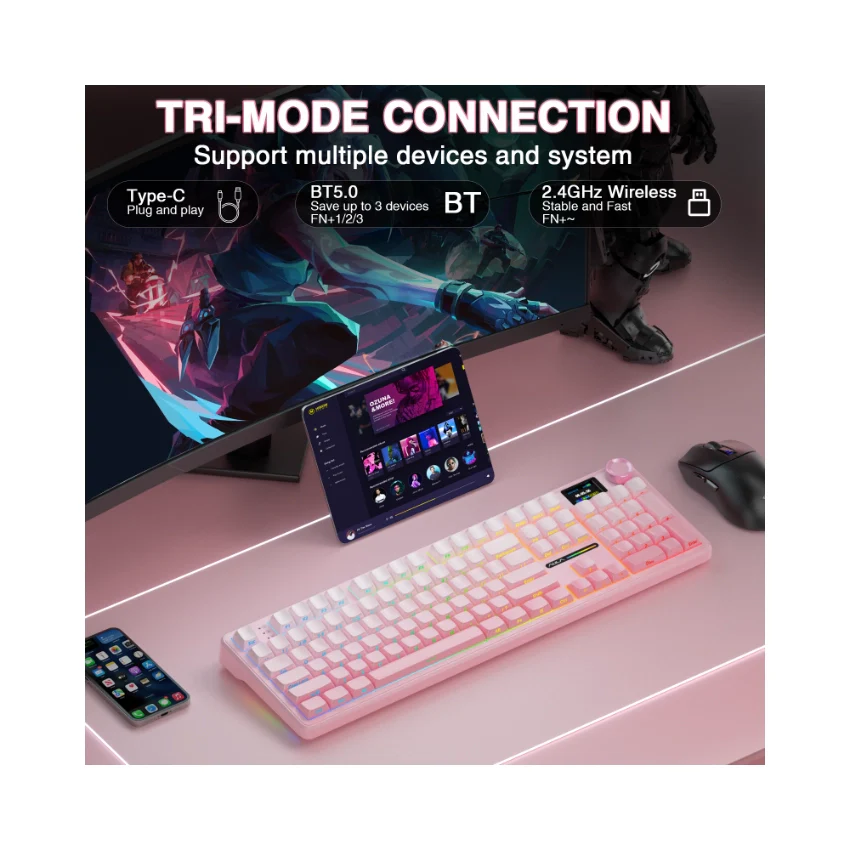
    2.This F108Pro mechanical keyboard is compatible with Windows, Mac, IOS and Android systems, but the software only supports Windows system and wired mode.

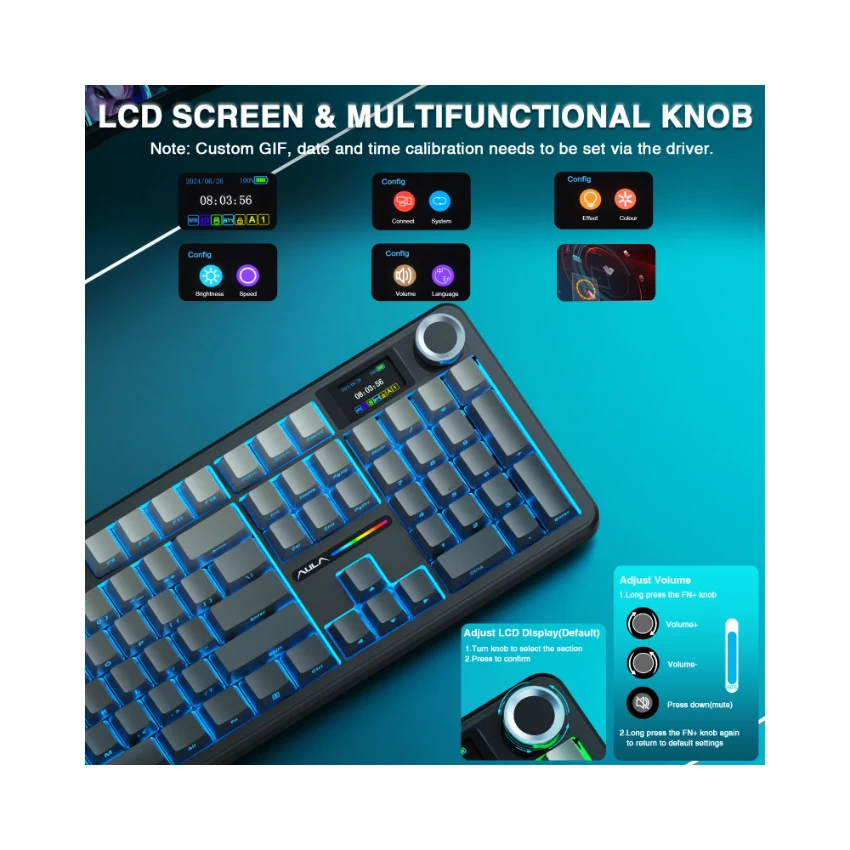
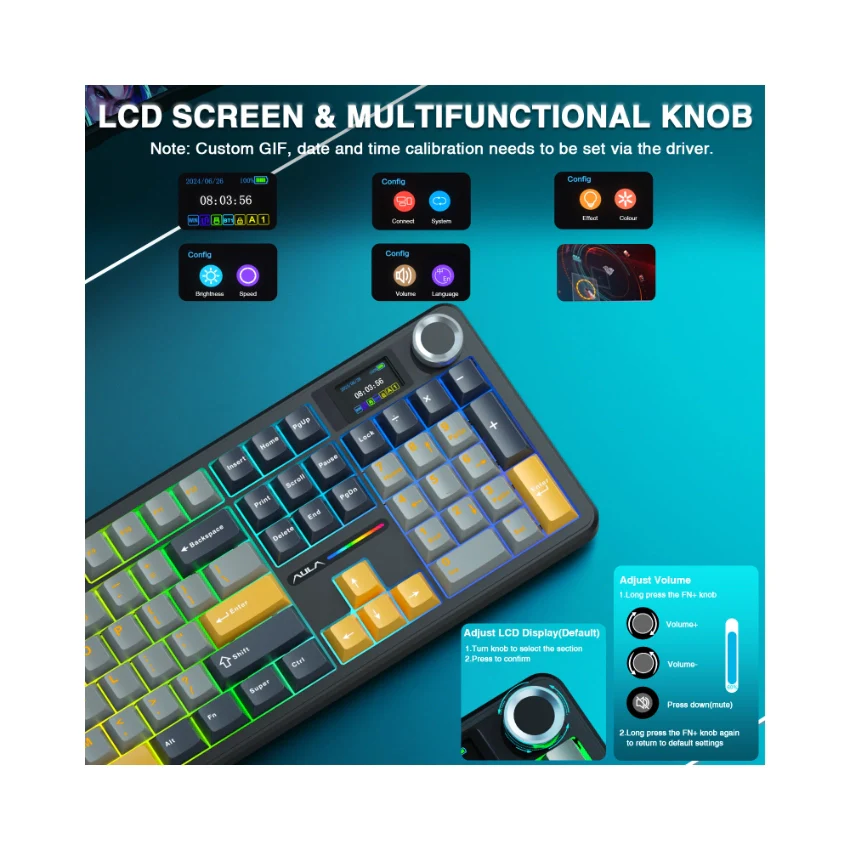
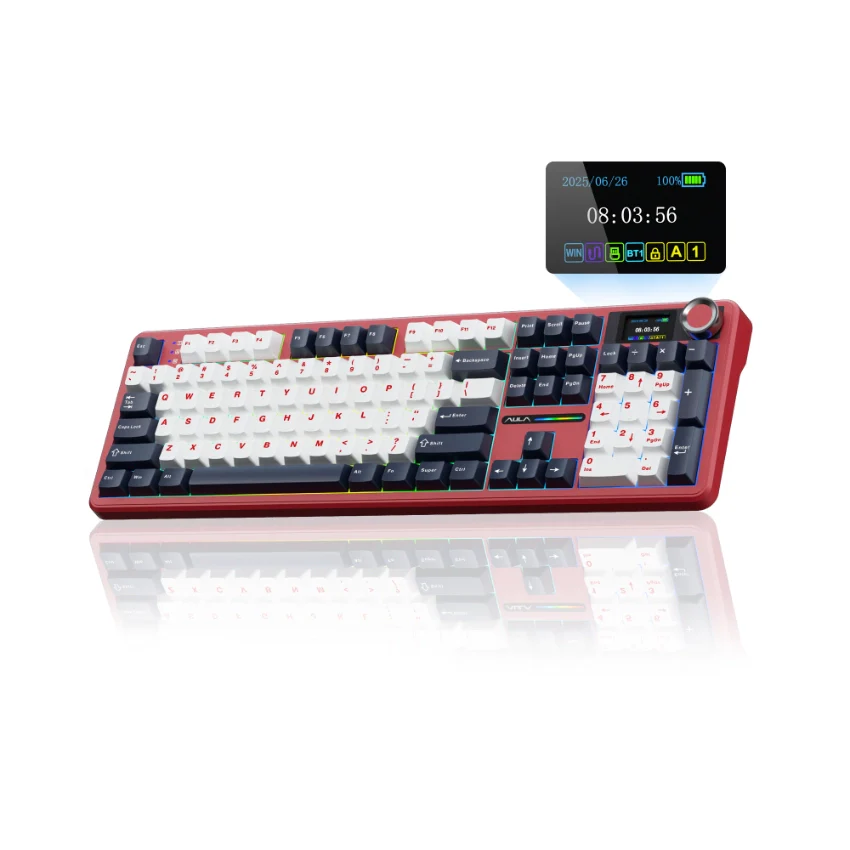
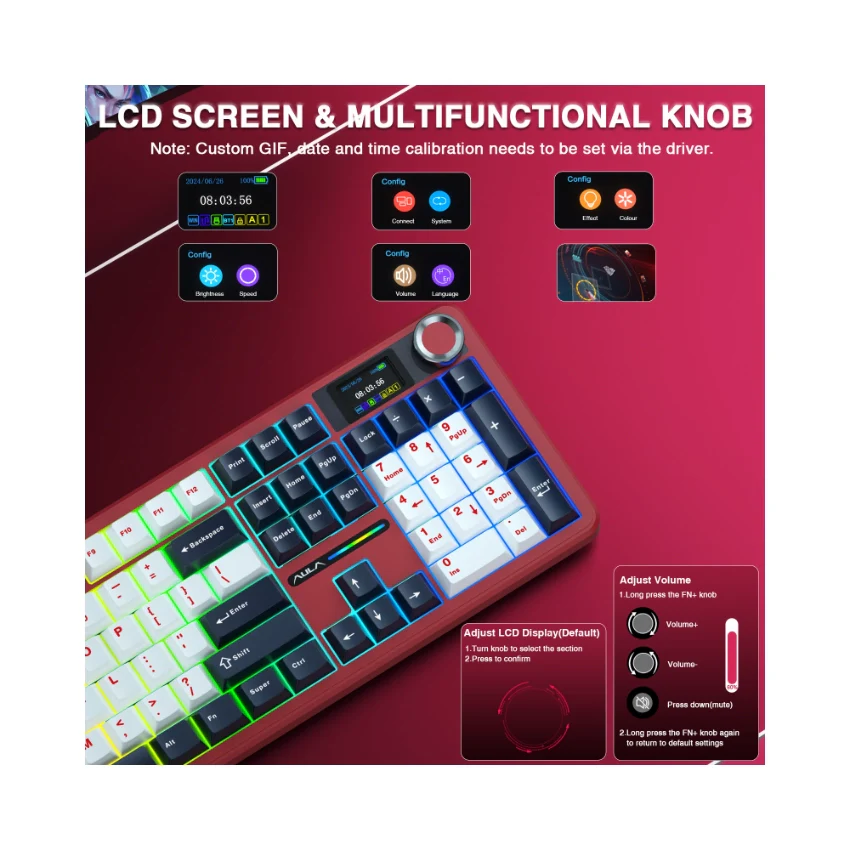
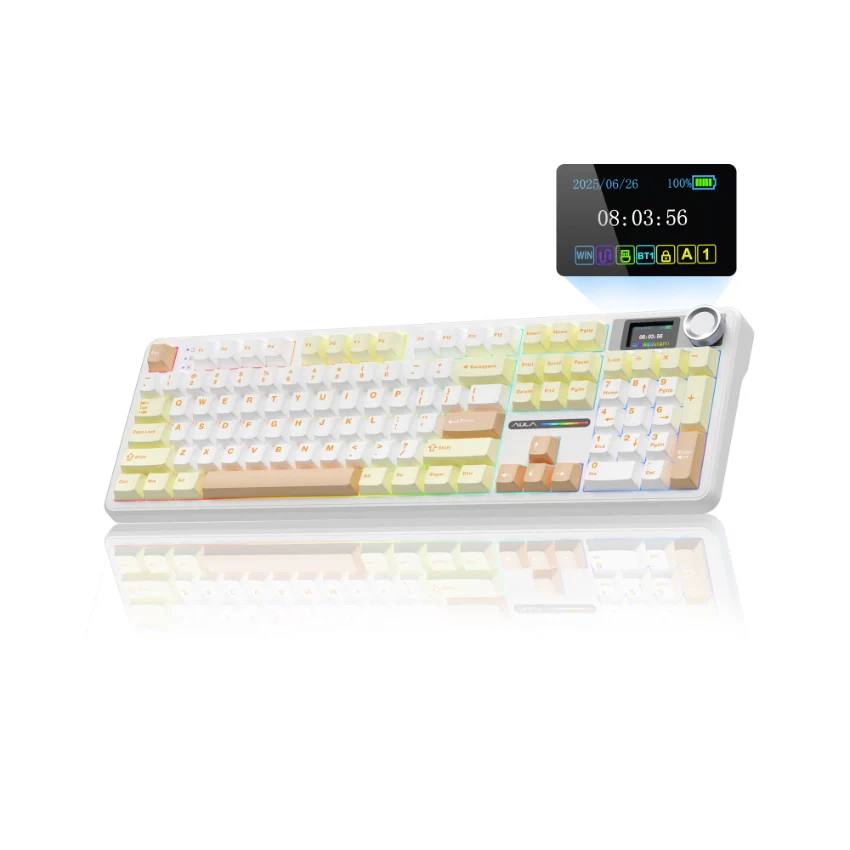
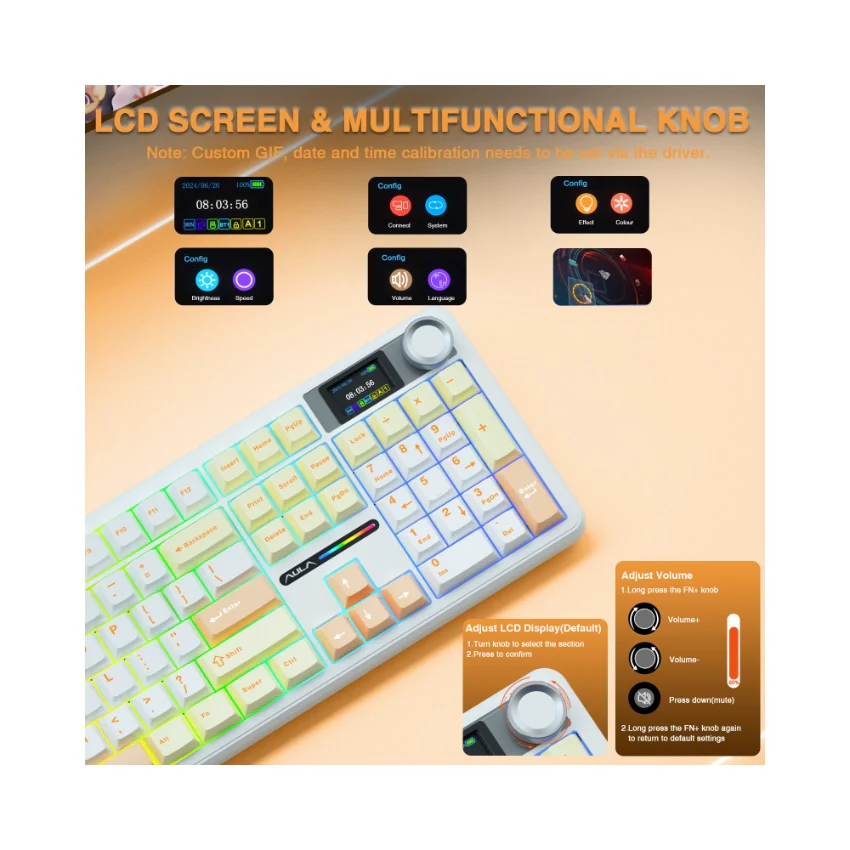
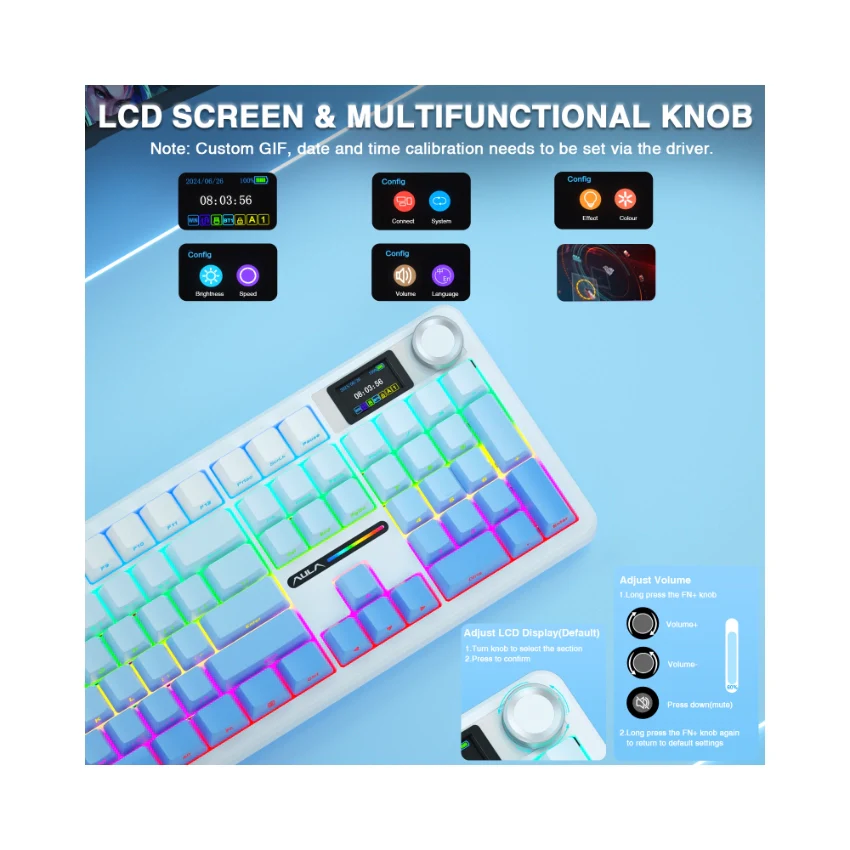
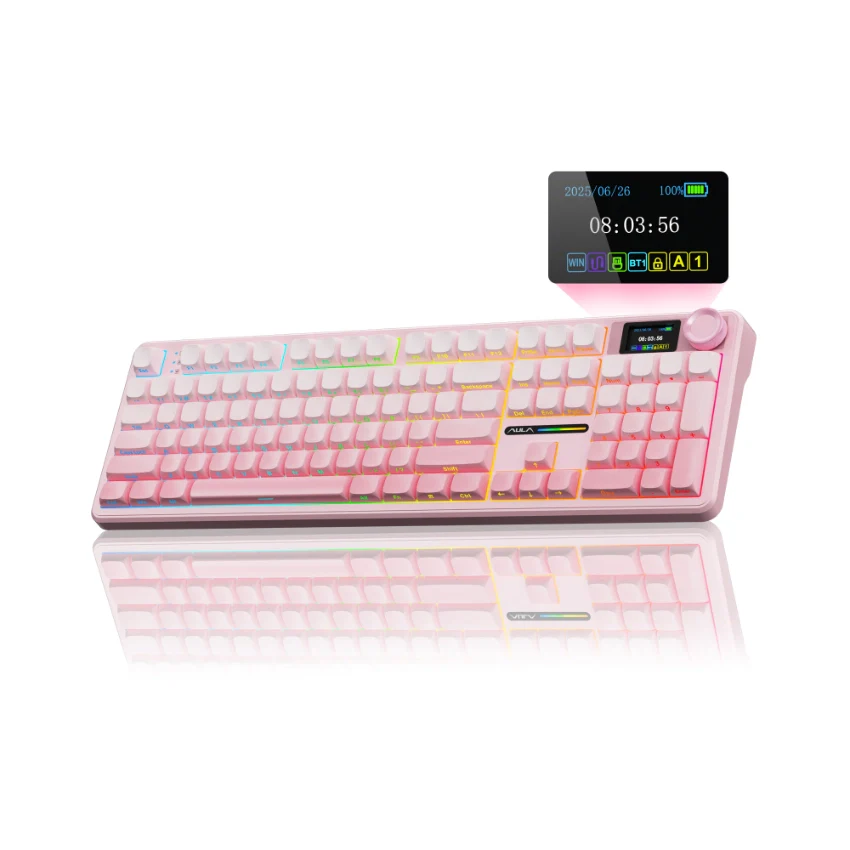
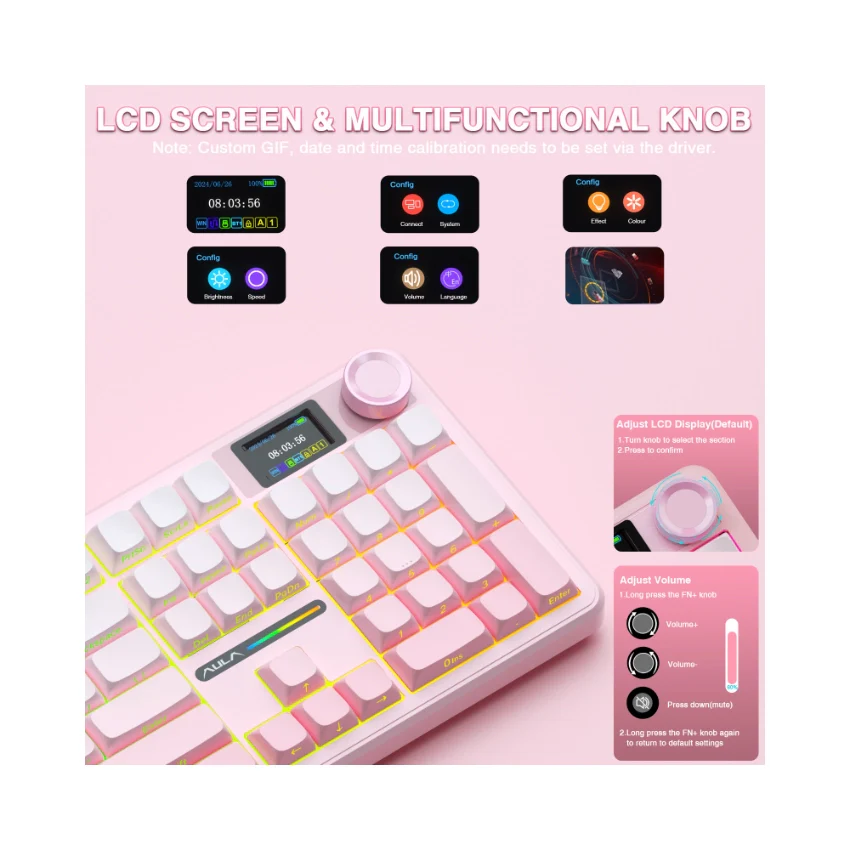
  • How to calibrate the date/time and custom GIF images on the screen?

    1.Download and install the F108pro driver in wired mode with windows system.

    2.Find the "TFT screen" and click to "Time Syns" button.

    3.Upload an image or gif

    Note: The LCD screen has a transparent protective film that can be peeled off before use.

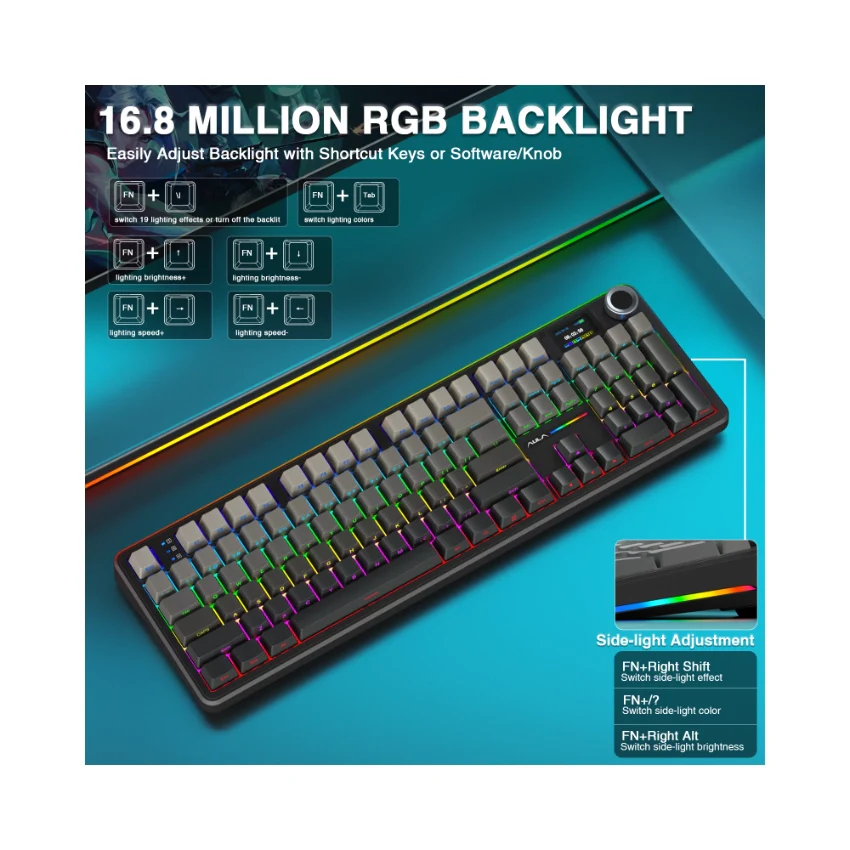
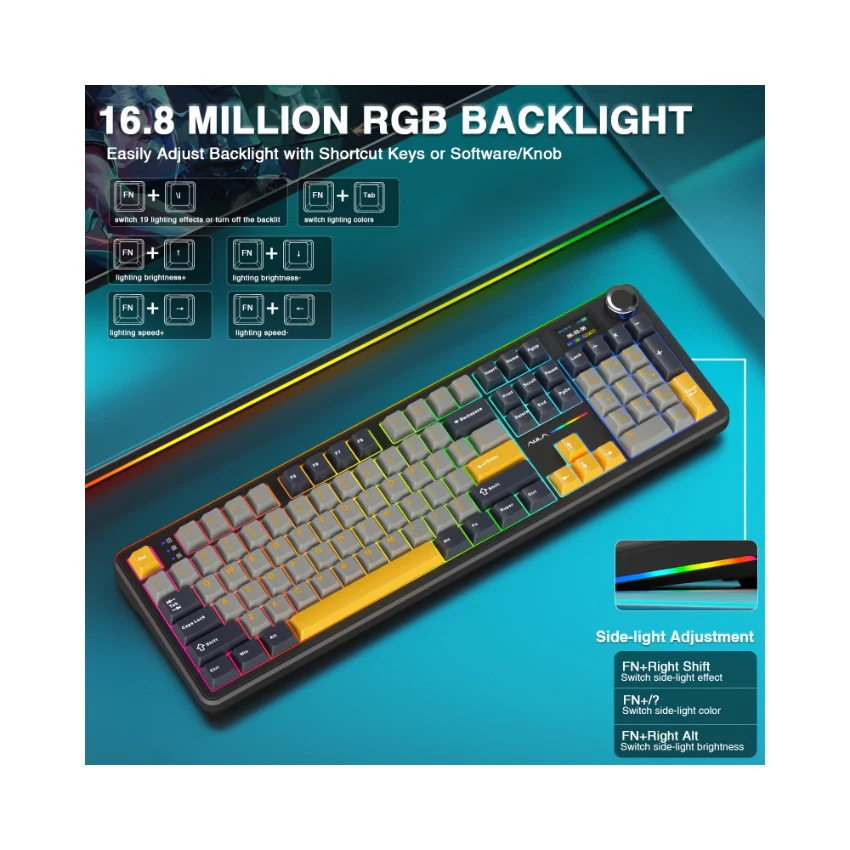
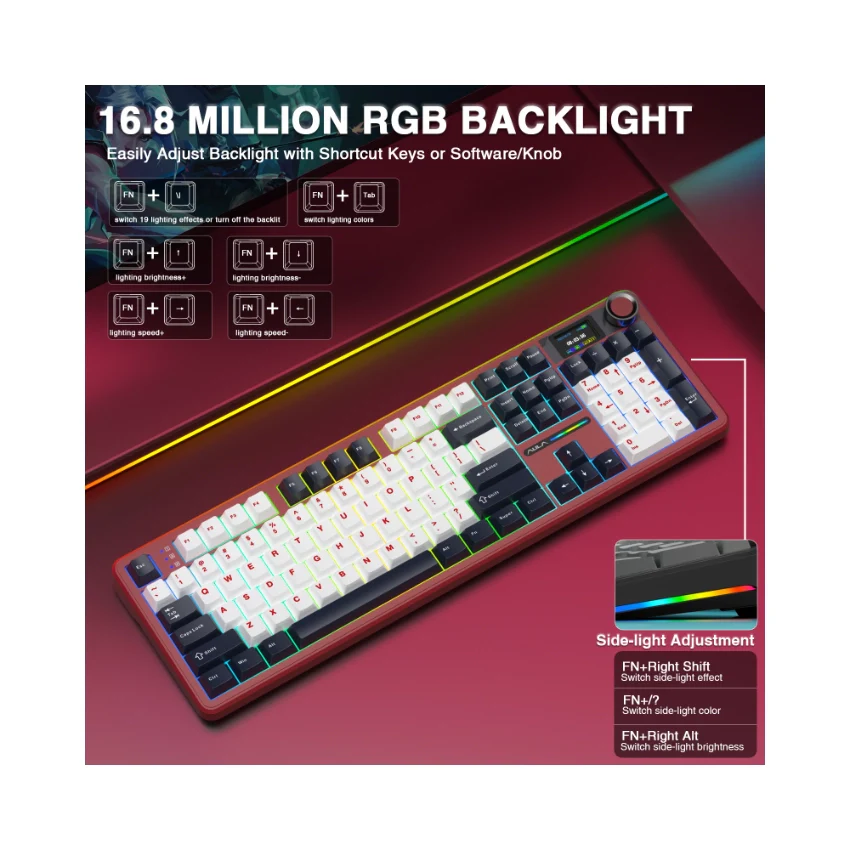
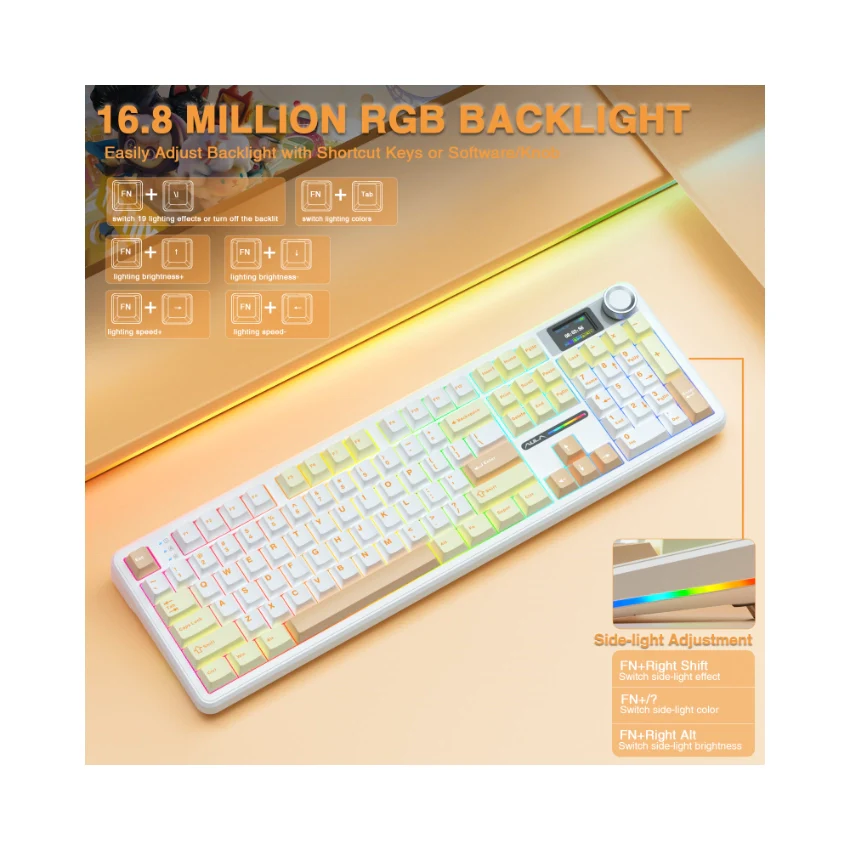
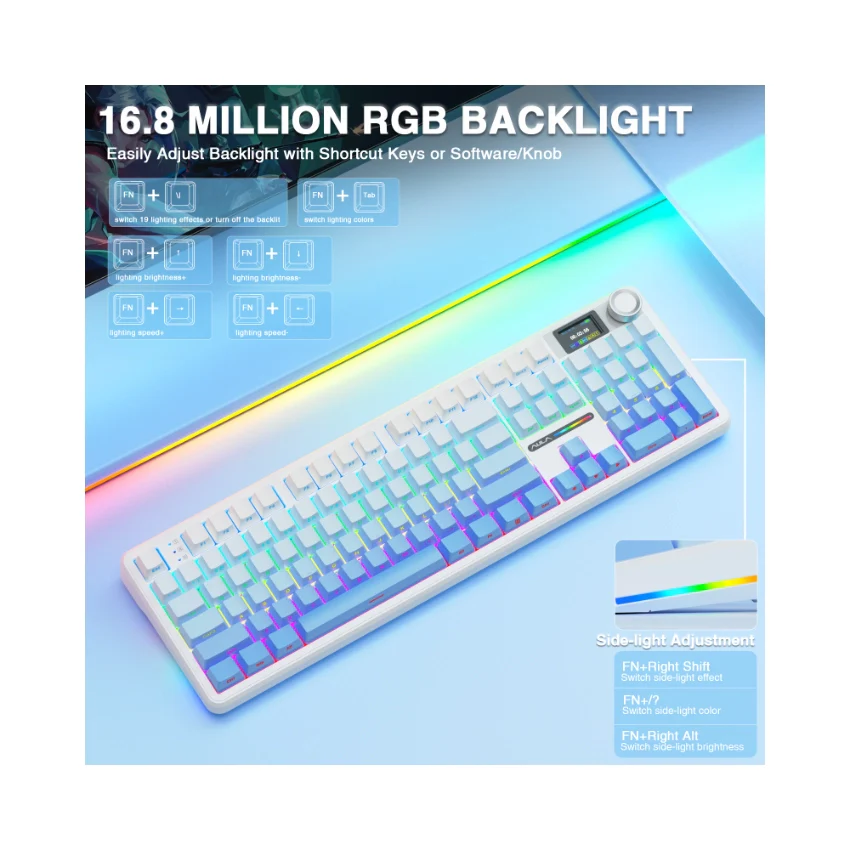
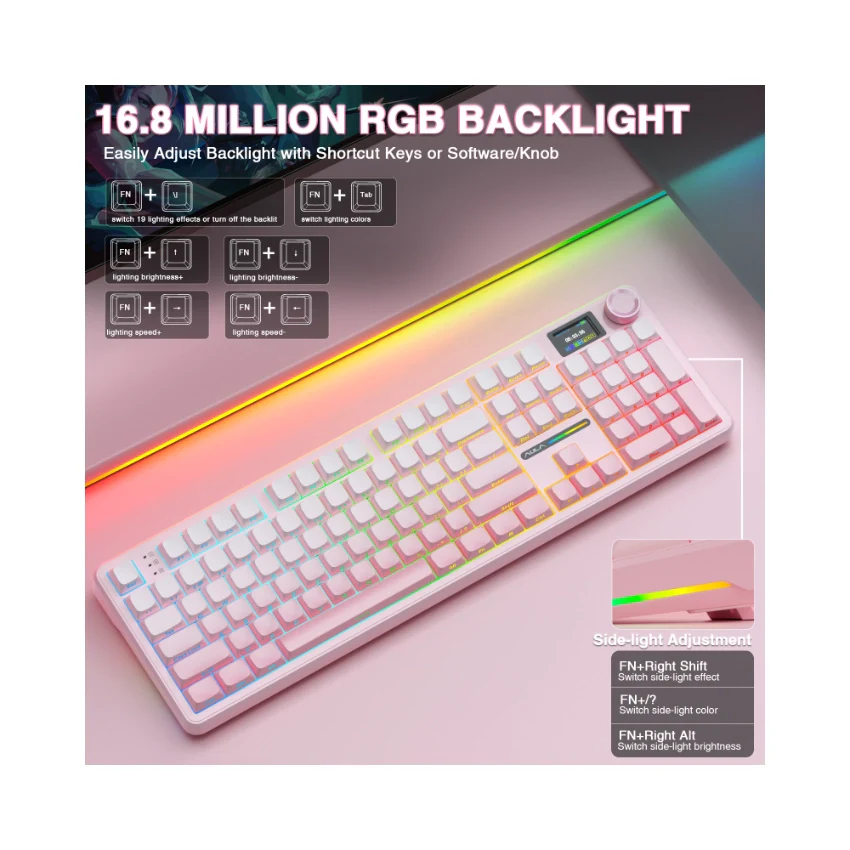
  • AULA F108 Pro backlight/side light shortcut key?

    Backlight Adjustment:

    FN+\|=switch 19 lighting effects;FN+Tab=switch lighting colors;FN+↑/↓=lighting brightness+/-;FN+→/←=lighting speed+/-

    Side Light Adjustment:

    FN+Right Shift=Switch effect;FN+/?=Switch color;FN+Right Alt=Switch brightness

  • How to quickly solve keyboard unresponsive or other unknown issues?

    Reset the keyboard by holding down FN+ESC for a few seconds until the keyboard light flashes

  • How to view the instruction manual? And receiving incorrect product colors

    Scan the QR on the card inside the packaging to view the instruction manual

    The keyboard packaging is uniformly gray yellow, please refer to the actual color inside the packaging for accuracy


AULA F108 Pro Full Size vision Knob Keyboard - Image 2

Details & Craftsmanship

Every detail has been carefully considered to bring you the perfect product.
AULA F108 Pro Full Size vision Knob Keyboard - Image 3

Details & Craftsmanship

Every detail has been carefully considered to bring you the perfect product.
AULA F108 Pro Full Size vision Knob Keyboard - Image 4

Details & Craftsmanship

Every detail has been carefully considered to bring you the perfect product.
AULA F108 Pro Full Size vision Knob Keyboard - Image 5

Details & Craftsmanship

Every detail has been carefully considered to bring you the perfect product.
AULA F108 Pro Full Size vision Knob Keyboard - Image 6

Details & Craftsmanship

Every detail has been carefully considered to bring you the perfect product.
AULA F108 Pro Full Size vision Knob Keyboard - Image 7

Details & Craftsmanship

Every detail has been carefully considered to bring you the perfect product.
AULA F108 Pro Full Size vision Knob Keyboard - Image 8

Details & Craftsmanship

Every detail has been carefully considered to bring you the perfect product.
AULA F108 Pro Full Size vision Knob Keyboard - Image 9

Details & Craftsmanship

Every detail has been carefully considered to bring you the perfect product.
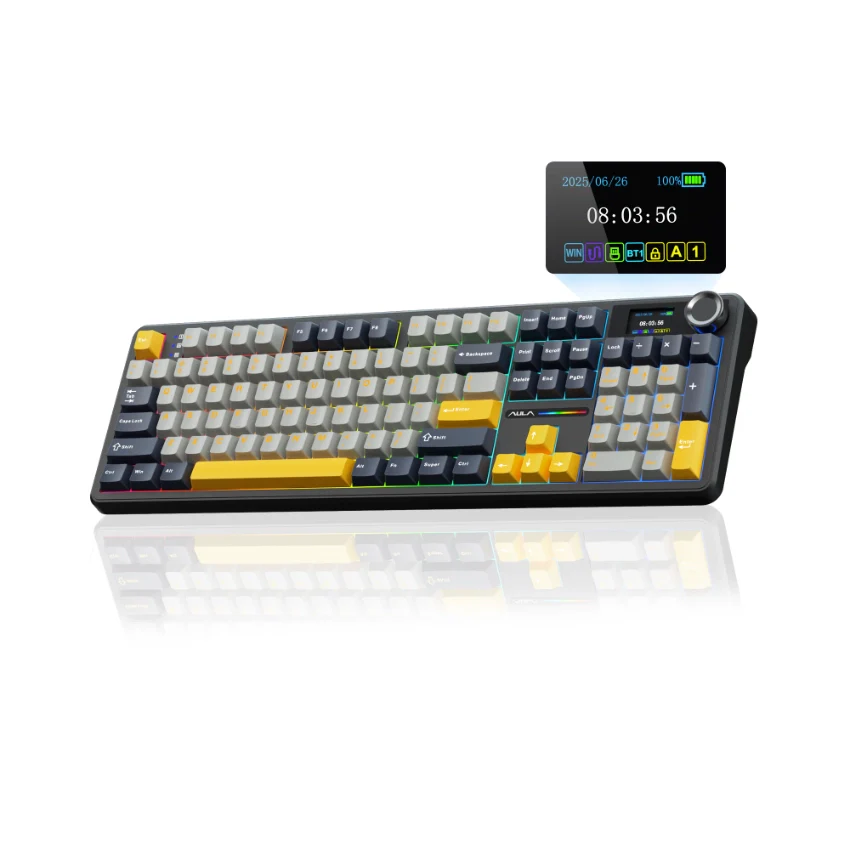
AULA F108 Pro Full Size vision Knob Keyboard - Image 10

Details & Craftsmanship

Every detail has been carefully considered to bring you the perfect product.
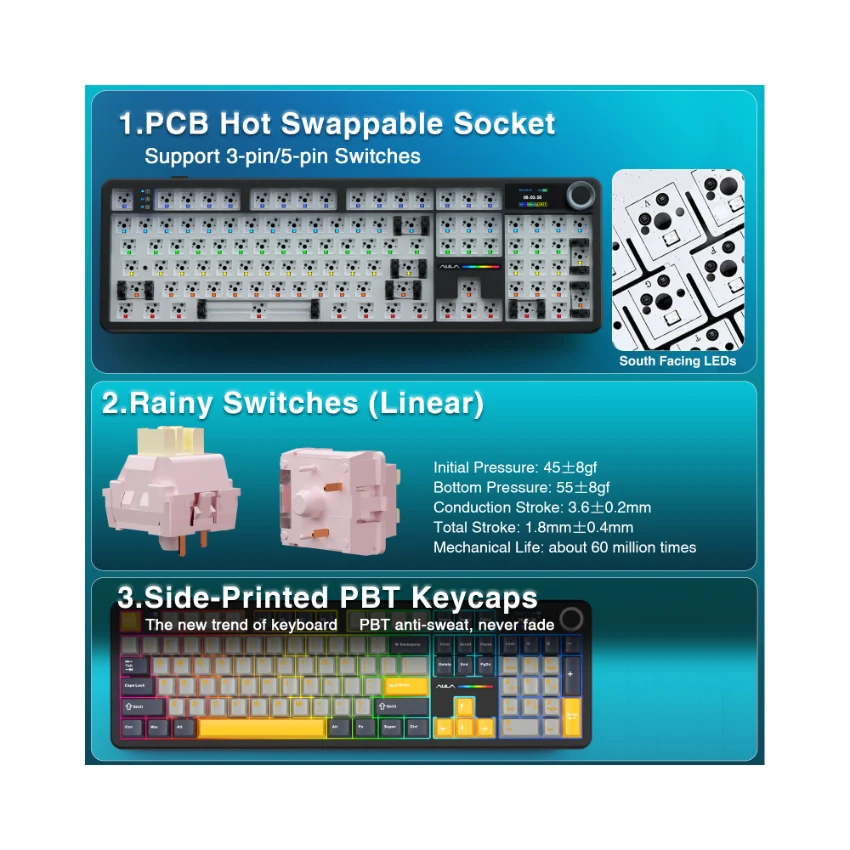
AULA F108 Pro Full Size vision Knob Keyboard - Image 11

Details & Craftsmanship

Every detail has been carefully considered to bring you the perfect product.
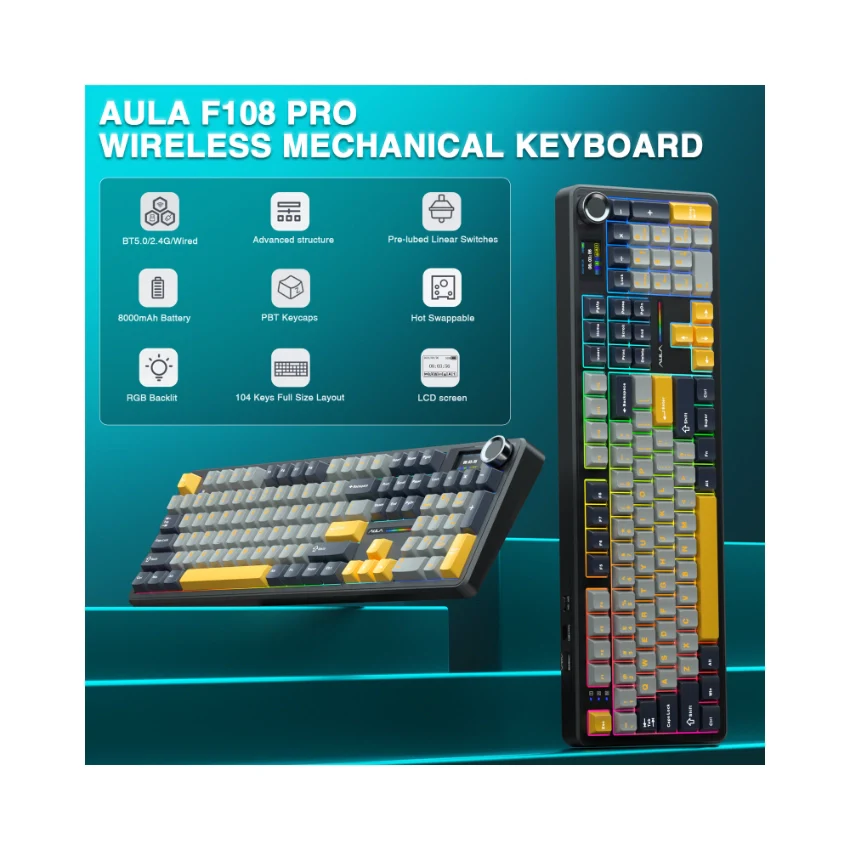
AULA F108 Pro Full Size vision Knob Keyboard - Image 12

Details & Craftsmanship

Every detail has been carefully considered to bring you the perfect product.
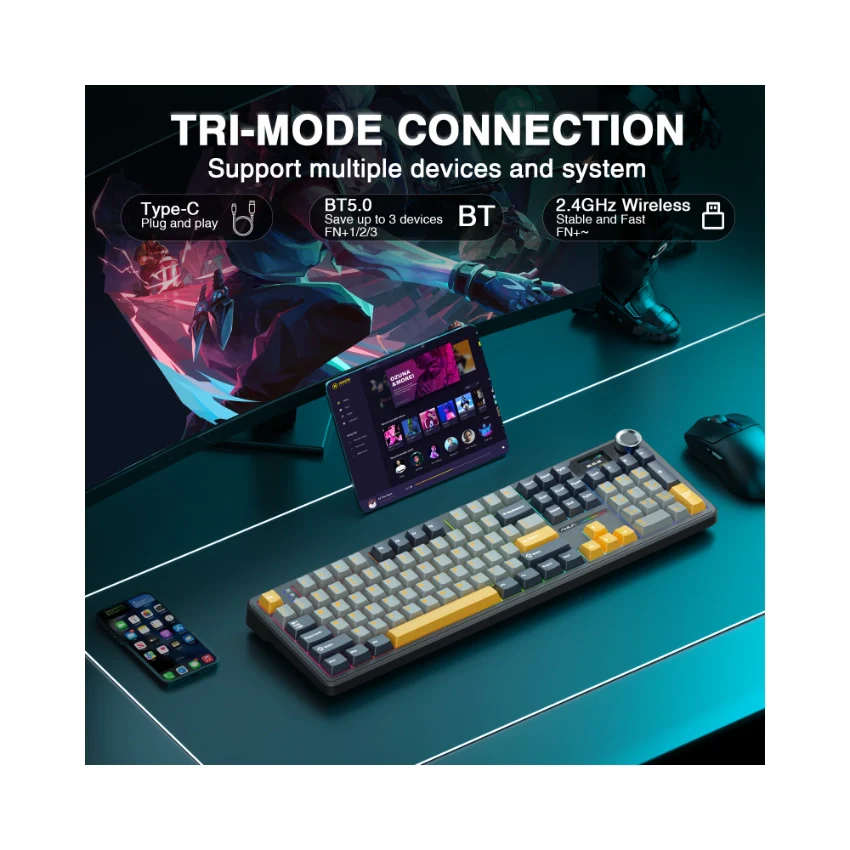
AULA F108 Pro Full Size vision Knob Keyboard - Image 13

Details & Craftsmanship

Every detail has been carefully considered to bring you the perfect product.
AULA F108 Pro Full Size vision Knob Keyboard - Image 14

Details & Craftsmanship

Every detail has been carefully considered to bring you the perfect product.
AULA F108 Pro Full Size vision Knob Keyboard - Image 15

Details & Craftsmanship

Every detail has been carefully considered to bring you the perfect product.
AULA F108 Pro Full Size vision Knob Keyboard - Image 16

Details & Craftsmanship

Every detail has been carefully considered to bring you the perfect product.
AULA F108 Pro Full Size vision Knob Keyboard - Image 17

Details & Craftsmanship

Every detail has been carefully considered to bring you the perfect product.
AULA F108 Pro Full Size vision Knob Keyboard - Image 18

Details & Craftsmanship

Every detail has been carefully considered to bring you the perfect product.
AULA F108 Pro Full Size vision Knob Keyboard - Image 19

Details & Craftsmanship

Every detail has been carefully considered to bring you the perfect product.
AULA F108 Pro Full Size vision Knob Keyboard - Image 20

Details & Craftsmanship

Every detail has been carefully considered to bring you the perfect product.
AULA F108 Pro Full Size vision Knob Keyboard - Image 21

Details & Craftsmanship

Every detail has been carefully considered to bring you the perfect product.
AULA F108 Pro Full Size vision Knob Keyboard - Image 22

Details & Craftsmanship

Every detail has been carefully considered to bring you the perfect product.
AULA F108 Pro Full Size vision Knob Keyboard - Image 23

Details & Craftsmanship

Every detail has been carefully considered to bring you the perfect product.
AULA F108 Pro Full Size vision Knob Keyboard - Image 24

Details & Craftsmanship

Every detail has been carefully considered to bring you the perfect product.
AULA F108 Pro Full Size vision Knob Keyboard - Image 25

Details & Craftsmanship

Every detail has been carefully considered to bring you the perfect product.
AULA F108 Pro Full Size vision Knob Keyboard - Image 26

Details & Craftsmanship

Every detail has been carefully considered to bring you the perfect product.
AULA F108 Pro Full Size vision Knob Keyboard - Image 27

Details & Craftsmanship

Every detail has been carefully considered to bring you the perfect product.
AULA F108 Pro Full Size vision Knob Keyboard - Image 28

Details & Craftsmanship

Every detail has been carefully considered to bring you the perfect product.
AULA F108 Pro Full Size vision Knob Keyboard - Image 29

Details & Craftsmanship

Every detail has been carefully considered to bring you the perfect product.
AULA F108 Pro Full Size vision Knob Keyboard - Image 30

Details & Craftsmanship

Every detail has been carefully considered to bring you the perfect product.
AULA F108 Pro Full Size vision Knob Keyboard - Image 31

Details & Craftsmanship

Every detail has been carefully considered to bring you the perfect product.
AULA F108 Pro Full Size vision Knob Keyboard - Image 32

Details & Craftsmanship

Every detail has been carefully considered to bring you the perfect product.
AULA F108 Pro Full Size vision Knob Keyboard - Image 33

Details & Craftsmanship

Every detail has been carefully considered to bring you the perfect product.
AULA F108 Pro Full Size vision Knob Keyboard - Image 34

Details & Craftsmanship

Every detail has been carefully considered to bring you the perfect product.
AULA F108 Pro Full Size vision Knob Keyboard - Image 35

Details & Craftsmanship

Every detail has been carefully considered to bring you the perfect product.
AULA F108 Pro Full Size vision Knob Keyboard - Image 36

Details & Craftsmanship

Every detail has been carefully considered to bring you the perfect product.
AULA F108 Pro Full Size vision Knob Keyboard - Image 37

Details & Craftsmanship

Every detail has been carefully considered to bring you the perfect product.
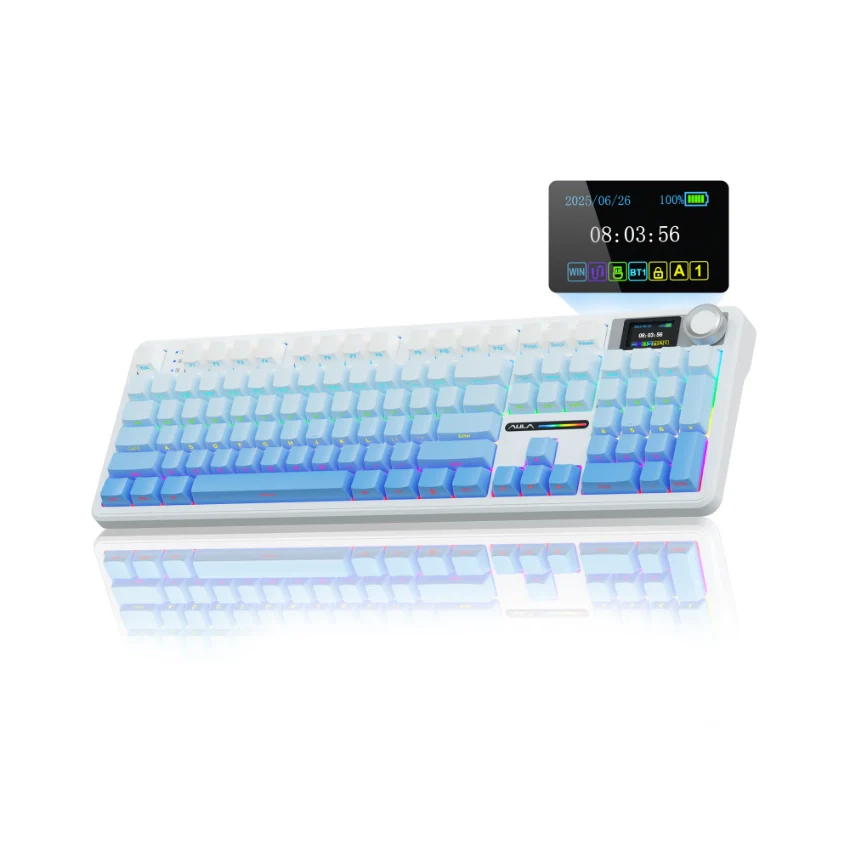
AULA F108 Pro Full Size vision Knob Keyboard - Image 38

Details & Craftsmanship

Every detail has been carefully considered to bring you the perfect product.
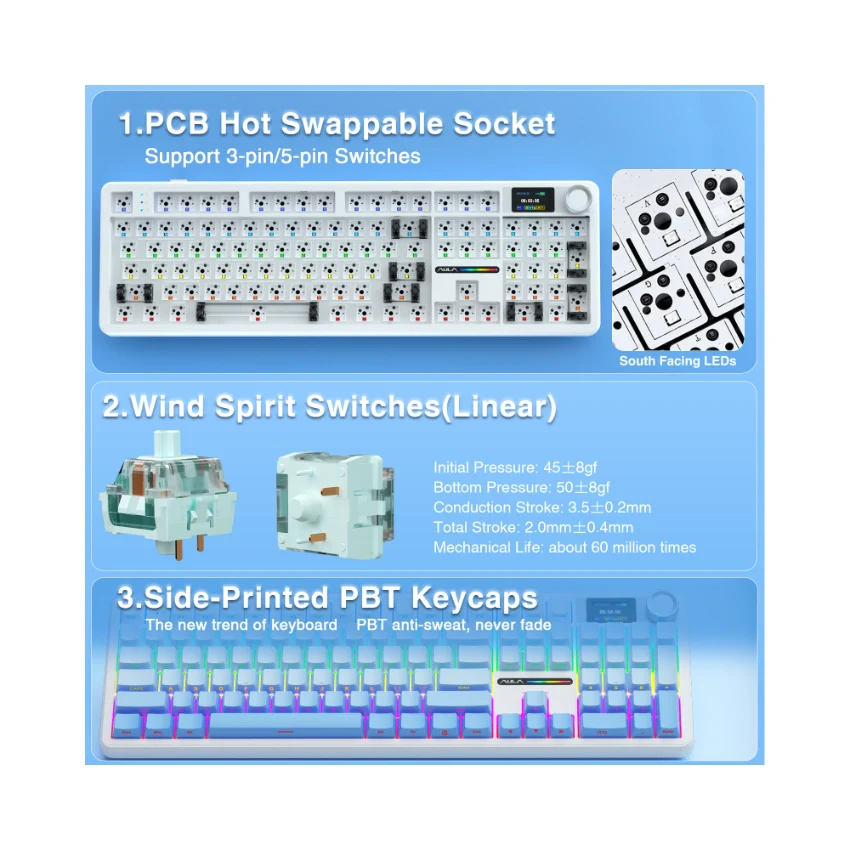
AULA F108 Pro Full Size vision Knob Keyboard - Image 39

Details & Craftsmanship

Every detail has been carefully considered to bring you the perfect product.
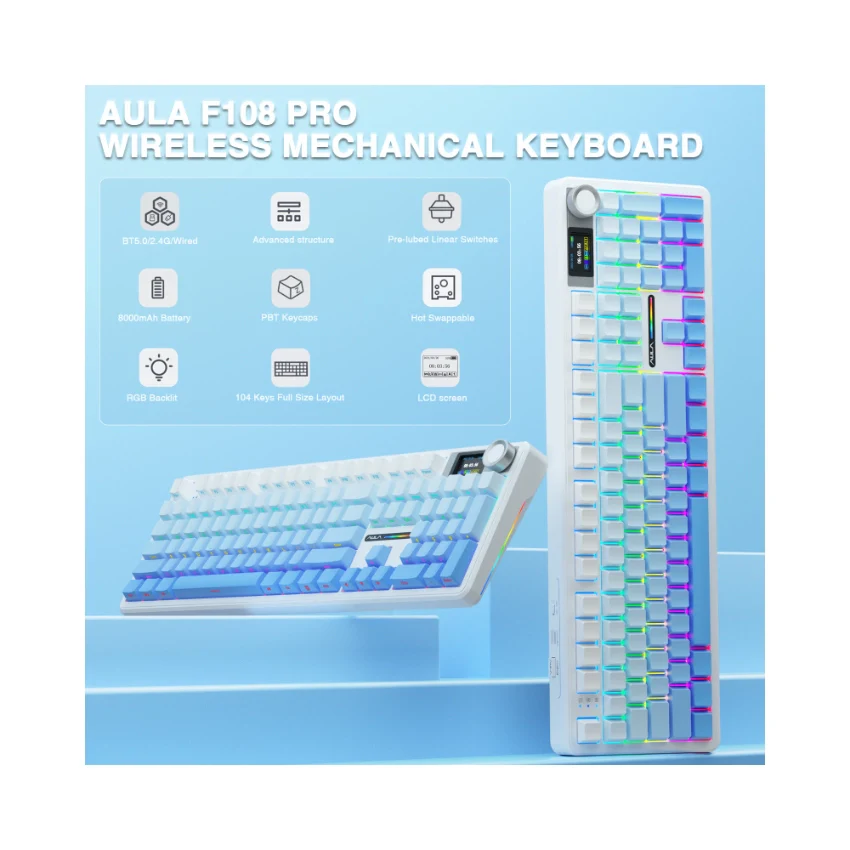
AULA F108 Pro Full Size vision Knob Keyboard - Image 40

Details & Craftsmanship

Every detail has been carefully considered to bring you the perfect product.
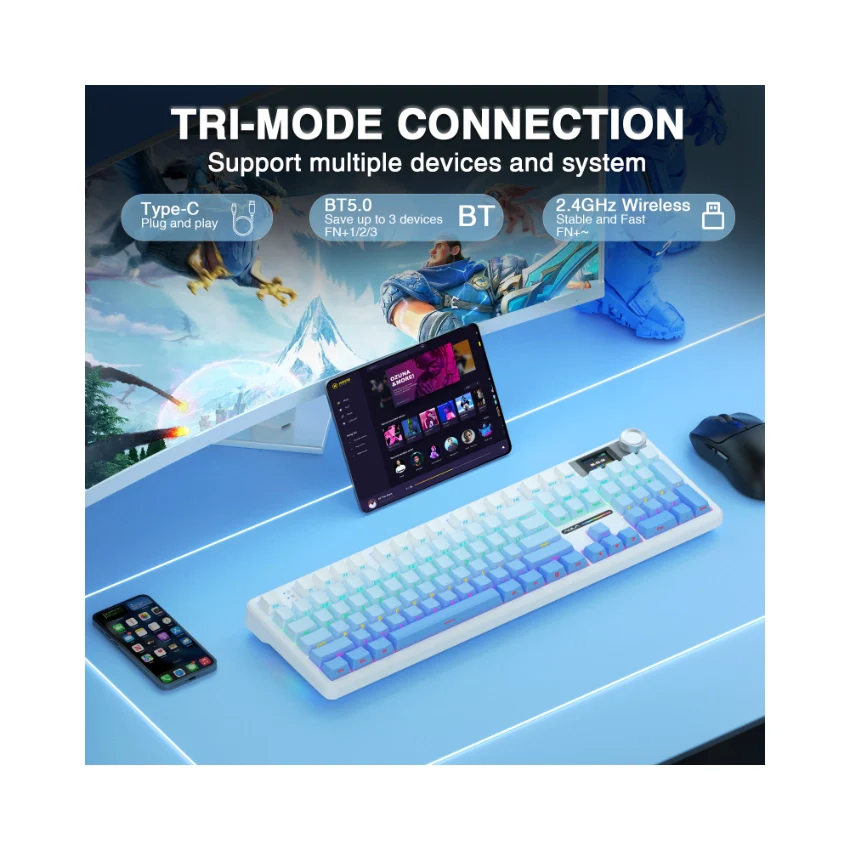
AULA F108 Pro Full Size vision Knob Keyboard - Image 41

Details & Craftsmanship

Every detail has been carefully considered to bring you the perfect product.
AULA F108 Pro Full Size vision Knob Keyboard - Image 42

Details & Craftsmanship

Every detail has been carefully considered to bring you the perfect product.
AULA F108 Pro Full Size vision Knob Keyboard - Image 43

Details & Craftsmanship

Every detail has been carefully considered to bring you the perfect product.
AULA F108 Pro Full Size vision Knob Keyboard - Image 44

Details & Craftsmanship

Every detail has been carefully considered to bring you the perfect product.
AULA F108 Pro Full Size vision Knob Keyboard - Image 45

Details & Craftsmanship

Every detail has been carefully considered to bring you the perfect product.
AULA F108 Pro Full Size vision Knob Keyboard - Image 46

Details & Craftsmanship

Every detail has been carefully considered to bring you the perfect product.
AULA F108 Pro Full Size vision Knob Keyboard - Image 47

Details & Craftsmanship

Every detail has been carefully considered to bring you the perfect product.
AULA F108 Pro Full Size vision Knob Keyboard - Image 48

Details & Craftsmanship

Every detail has been carefully considered to bring you the perfect product.
AULA F108 Pro Full Size vision Knob Keyboard - Image 49

Details & Craftsmanship

Every detail has been carefully considered to bring you the perfect product.
AULA F108 Pro Full Size vision Knob Keyboard - Image 50

Details & Craftsmanship

Every detail has been carefully considered to bring you the perfect product.
AULA F108 Pro Full Size vision Knob Keyboard - Image 51

Details & Craftsmanship

Every detail has been carefully considered to bring you the perfect product.
AULA F108 Pro Full Size vision Knob Keyboard - Image 52

Details & Craftsmanship

Every detail has been carefully considered to bring you the perfect product.
AULA F108 Pro Full Size vision Knob Keyboard - Image 53

Details & Craftsmanship

Every detail has been carefully considered to bring you the perfect product.
AULA F108 Pro Full Size vision Knob Keyboard - Image 54

Details & Craftsmanship

Every detail has been carefully considered to bring you the perfect product.
AULA F108 Pro Full Size vision Knob Keyboard - Image 55

Details & Craftsmanship

Every detail has been carefully considered to bring you the perfect product.

Description


Product Description
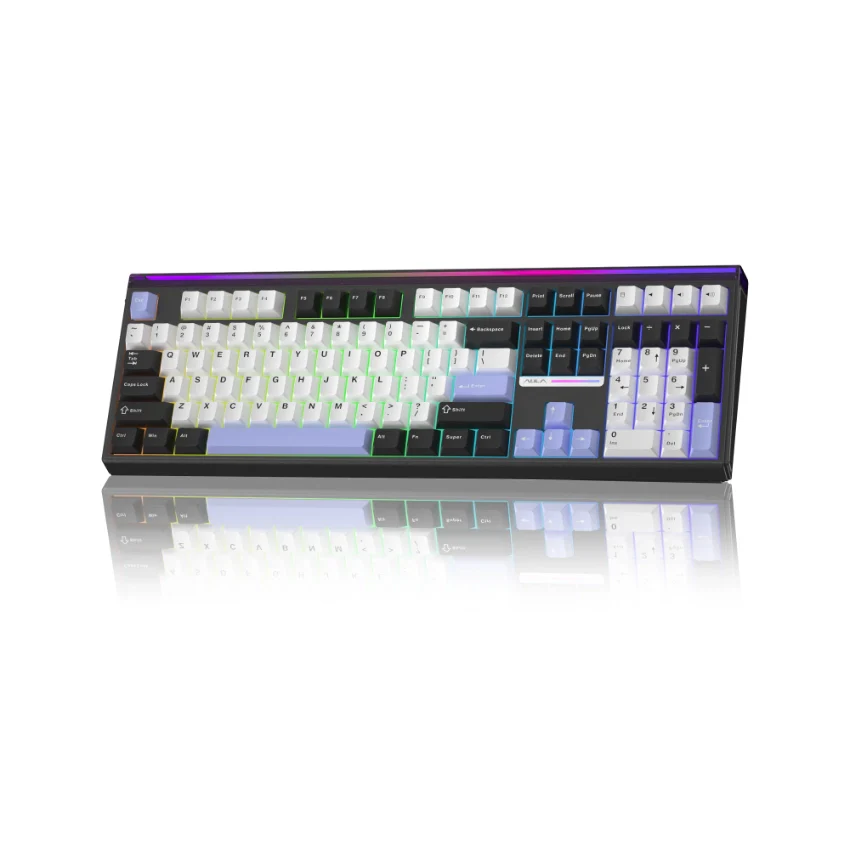
AULA F108 PRO - computer keyboard

AULA F108 PRO - creamy keyboard with number pad
  • How to download the software? Is it compatible with Mac?

    1.Download the software via bit.ly/m/AULA

    2.This F108Pro mechanical keyboard is compatible with Windows, Mac, IOS and Android systems, but the software only supports Windows system and wired mode.

  • How to calibrate the date/time and custom GIF images on the screen?

    1.Download and install the F108pro driver in wired mode with windows system.

    2.Find the "TFT screen" and click to "Time Syns" button.

    3.Upload an image or gif

    Note: The LCD screen has a transparent protective film that can be peeled off before use.

  • AULA F108 Pro backlight/side light shortcut key?

    Backlight Adjustment:

    FN+\|=switch 19 lighting effects;FN+Tab=switch lighting colors;FN+↑/↓=lighting brightness+/-;FN+→/←=lighting speed+/-

    Side Light Adjustment:

    FN+Right Shift=Switch effect;FN+/?=Switch color;FN+Right Alt=Switch brightness

  • How to quickly solve keyboard unresponsive or other unknown issues?

    Reset the keyboard by holding down FN+ESC for a few seconds until the keyboard light flashes

  • How to view the instruction manual? And receiving incorrect product colors

    Scan the QR on the card inside the packaging to view the instruction manual

    The keyboard packaging is uniformly gray yellow, please refer to the actual color inside the packaging for accuracy